How to Measure Your Pupillary Distance

What is Pupillary Distance (PD)
Pupillary distance is the distance, in millimeters, between the centers of your pupils. Because eye spacing varies from person to person, an accurate PD is essential. When your PD is correct, your lenses align with your eyes, improving clarity and visual comfort. If your prescription doesn’t already include your PD, you can measure it yourself.
How to measure PD
There are three reliable ways to measure your pupillary distance. Choose the option that works best for you.
Measure your PD with the LensDirect App (Fastest)

The LensDirect iOS app uses laser-sharp technology to measure your PD in real time. Simply download the app and select "Measure PD" at the bottom of the main page.

With good lighting, hold your phone at arm’s length and follow the on-screen instructions. Your PD will appear instantly and can be saved or shared.
Measure with the Online PD Calculator
You'll need either a tablet, phone, or laptop computer with a digital camera enabled and the volume up. Next, choose a light colored card with a magnetic strip. Go somewhere with a nice amount of light. Hold the card by the top corner, right above your eyebrows.

Using our PD calculator, you can take down your PD measurements by following the instructions. Within just a few moments, you’ll have a number that’s ready to go. If you’re logged into your LensDirect account, your PD will automatically be tagged to your account. If you're not logged in, make sure to write it down.
Measure PD with a Ruler
Use a plastic ruler or print our PD ruler. When printing, select “Actual size” or “No scaling” to avoid distortion. Once printed, the ruler should be about the size of an ID card.
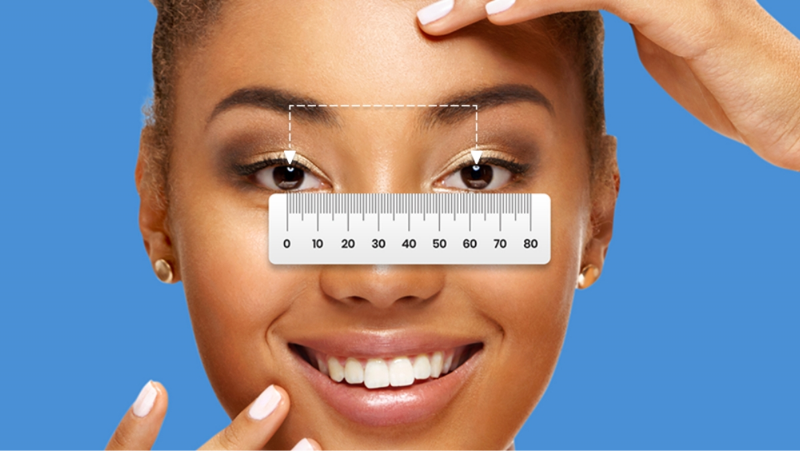
To measure, stand in front of a mirror. Align the zero mark with the center of your right pupil, then read the measurement at the center of your left pupil. Write the number down immediately. Most rulers give a single measurement (for example, 64 mm). If needed, you can divide it in half for monocular PDs—32 mm per eye in this example.
Enter your PD when ordering your glasses, and you’re set!


